IT Help Desk
Login Instructions
Remember to select Continue with Google when logging into the IT Help Desk.
-
Click here to head to the IT Help Desk (or double-click the
IT Help Deskicon on your desktop).IT Support

Supported by Core Techonomy, LLC
Double-click the IT Help Desk icon to create a ticket.
For immediate assistance, call 843-642-8322.
-
Click on
Continue with Google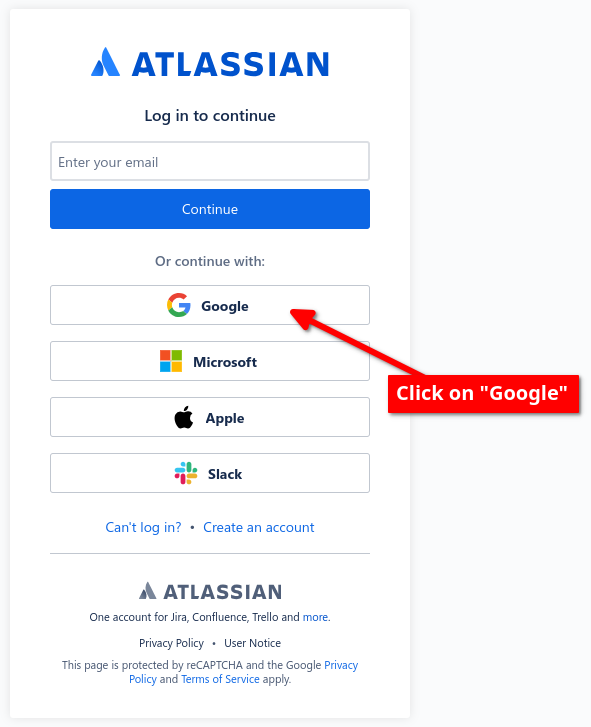
-
Select or input your Grosso Orthodontics email address and press
Next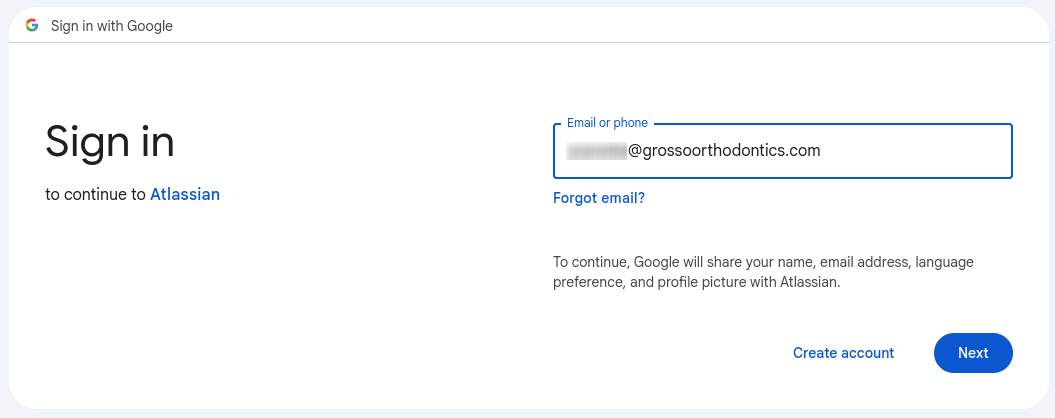 caution
You must use your
@grossoorthodontics.comemail address for this process —@grossokids.comwill not work here.
Conclusion
That's all you need to do to access the new IT Help Desk. The key thing is to press the Continue with Google button and you will be on your way to success. Thank you for your attention and please let me know if you have any questions or run into any problems.